
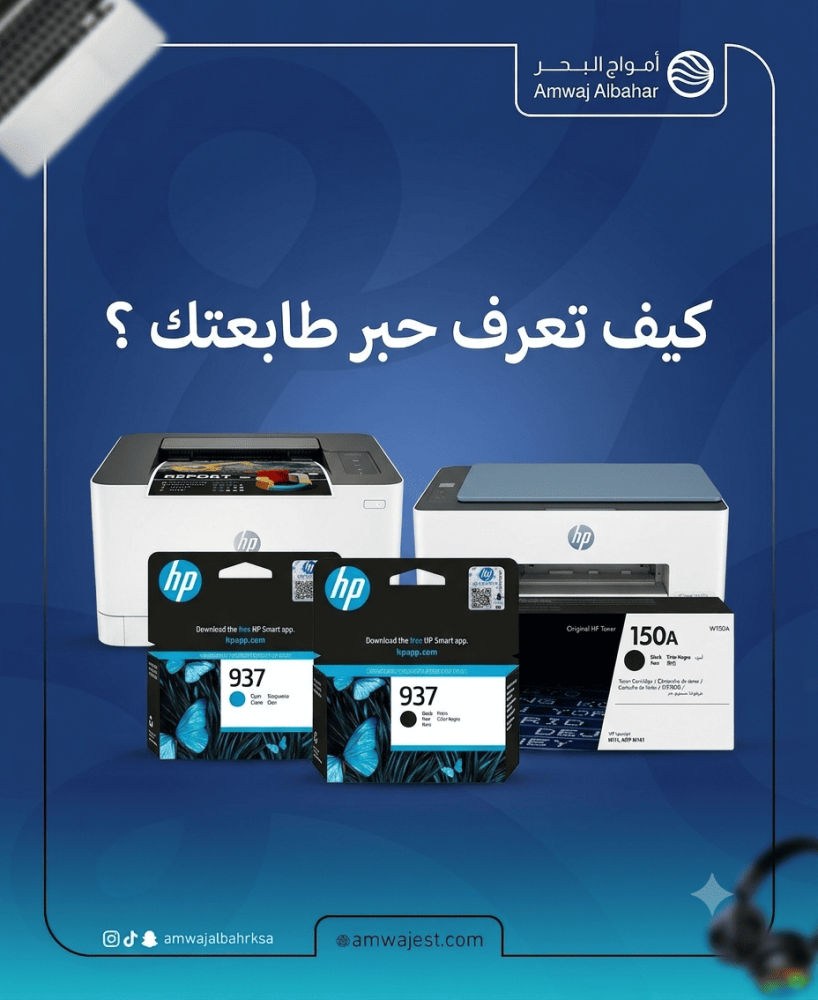

Printer Ink Codes and Compatibility Guide: How to Choose the Right Ink for Your Printer? 🖨️
Have you ever been in a situation like this: you went to buy printer ink and came back with a useless cartridge? Or you stood in front of the ink shelf at the store with dozens of codes and numbers and didn't know which one was correct? 😤
This is one of the most common problems among printer owners in Saudi Arabia — and solving it is easier than you imagine if you understand how the **compatibility code system** between the ink and the printer works.
In this comprehensive guide you will learn:
The fundamental difference between **laser toner** and **liquid ink**
How to read the ink code and understand its meaning
- Detailed examples of over 35 common ink codes with all compatible printers
The fastest and smartest way to find ink for any printer in seconds
---
First: Know your printer type before anything else 🔑
The first mistake many people make is trying to find the right ink without knowing what type of printer they have. There are two main types of ink that cannot be mixed:
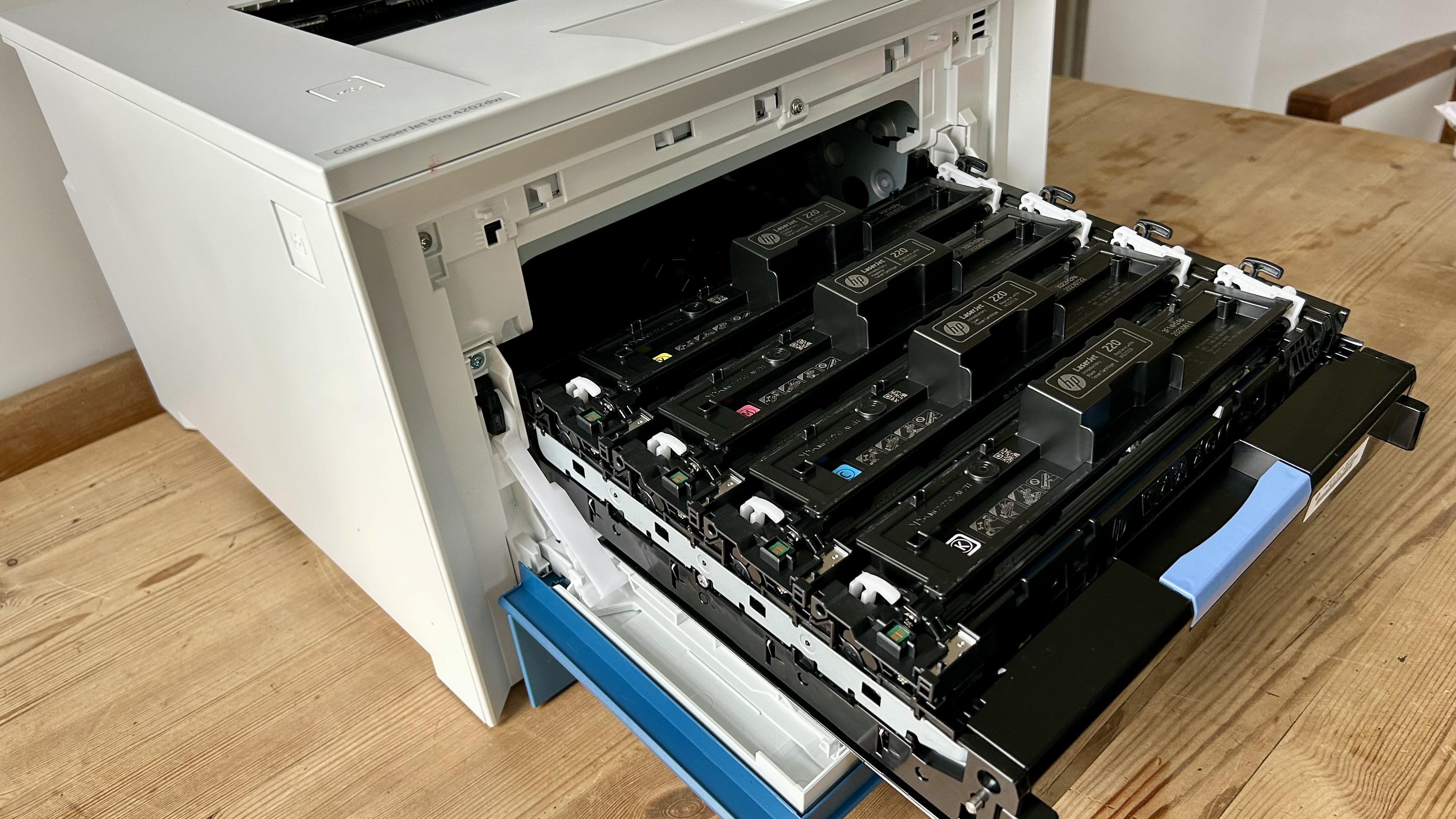
🔵 Laser printer — Toner
It uses a dry toner powder that adheres to the paper with heat. It's very fast, produces excellent text clarity, has a low cost per page, and the toner doesn't dry out if the printer is left unused for weeks.
**How do you know if your printer is a laser?** Look in its name for words like: LaserJet — Laser — imageCLASS — HL-Series — Phaser — WorkCentre.
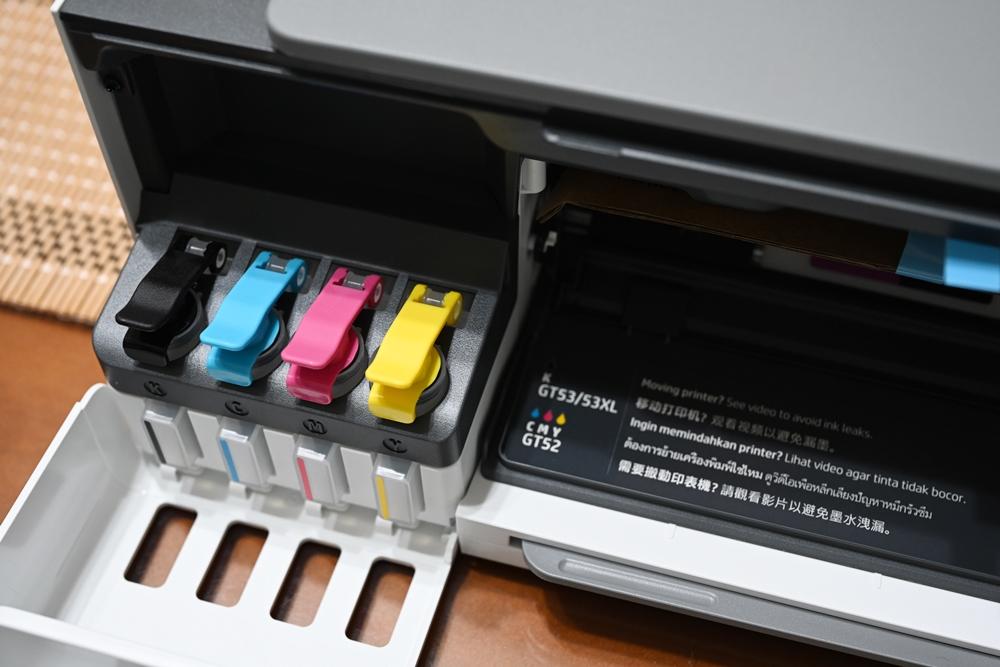
🟡 Liquid inkjet printer — Inkjet and EcoTank (Ink / EcoTank)
It sprays liquid ink onto paper. Its colors are more vibrant and beautiful, and it is suitable for printing photos, but the cartridge costs more and the ink may dry out if left for a long time.
*How do you know if your printer is an Inkjet?* Look for: DeskJet — PIXMA — EcoTank — Ink Advantage — WorkForce — Expression.
⚠️ **Golden Rule:** Never use laser toner in an inkjet printer and vice versa. Each type has its own specific toner.
---
Second: Where do you get the correct ink code? 🔍
Method 1 — from the cartridge currently in your printer
Open the printer door and remove the cartridge. The code is printed directly on its casing. This is the most accurate reference—don't rely on memory, read it directly.
The second method — from the printer settings page
Print the "Configuration Page" or "Printer Report" from the printer settings menu. The compatible cartridge code will be clearly displayed there.
The third method — from the printer model
Search by your printer's full name with the keyword "compatible toner" or use the specialized search tool that we will mention at the end of the article.
Third: Laser Toner Guide — Compatible Codes and Printers 🔵
Compatible printers:
HP LaserJet Pro P1102
HP LaserJet Pro P1102w
HP LaserJet Pro M1132
HP LaserJet Pro M1210
HP LaserJet Pro M1212nf
HP LaserJet Pro M1214nfh
HP LaserJet Pro M1217nfw
Print capacity: 1,600 pages at 5% coverage.
When should you choose it? If your printer is one of the models above and prints in medium quantities.
---
Compatible printers:
HP LaserJet Pro P1566
HP LaserJet Pro P1606dn
HP LaserJet Pro M1536dnf
Printing capacity: 2,100 pages.
---
**One of the earliest HP codes to become widely used — the 1020 printer remains one of the most frequently used printers in Saudi Arabia to this day.**
Compatible printers:
HP LaserJet 1010
HP LaserJet 1012
HP LaserJet 1015
HP LaserJet 1018
HP LaserJet 1020
HP LaserJet 1020 Plus
HP LaserJet 1022
HP LaserJet 3015
HP LaserJet 3020
HP LaserJet 3030
HP LaserJet 3050
HP LaserJet 3052
HP LaserJet 3055
HP LaserJet M1005 MFP
HP LaserJet M1319f MFP
Printing capacity: 2,000 pages.
---
Compatible printers:
HP LaserJet P2035
HP LaserJet P2035n
HP LaserJet P2055d
HP LaserJet P2055dn
HP LaserJet P2055x
Print capacity: 2,300 pages. The CE505X is available with a capacity of 6,500 pages.
---
Compatible printers:
HP LaserJet Pro M102a
HP LaserJet Pro M102w
HP LaserJet Pro MFP M130a
HP LaserJet Pro MFP M130fn
HP LaserJet Pro MFP M130fw
HP LaserJet Pro MFP M130nw
Printing capacity: 1,600 pages.
---
**One of the most requested codes for mid-range office printers.**
Compatible printers:
HP LaserJet Pro M402d
HP LaserJet Pro M402dn
HP LaserJet Pro M402dne
HP LaserJet Pro M402dw
HP LaserJet Pro M402n
HP LaserJet Pro MFP M426dw
HP LaserJet Pro MFP M426fdn
HP LaserJet Pro MFP M426fdw
Print capacity: 3,100 pages. The CF226X is available with a capacity of 9,000 pages.
---
Compatible printers:
HP LaserJet Pro M404n
HP LaserJet Pro M404dn
HP LaserJet Pro M404dw
HP LaserJet Pro MFP M428dw
HP LaserJet Pro MFP M428fdn
HP LaserJet Pro MFP M428fdw
HP LaserJet Pro MFP M329dn
HP LaserJet Pro MFP M329dw
Print capacity: 3,000 pages. The CF258X is available with a capacity of 10,000 pages.
---
Compatible printers:
HP LaserJet Pro 400 M401a
HP LaserJet Pro 400 M401d
HP LaserJet Pro 400 M401dn
HP LaserJet Pro 400 M401dw
HP LaserJet Pro 400 M401n
- HP LaserJet Pro 400 MFP M425dn
- HP LaserJet Pro 400 MFP M425dw
Printing capacity: 2,700 pages.
---
HP 105A Toner — Code W1105A
**From HP's latest budget-friendly series.**
Compatible printers:
HP LaserJet 107a
HP LaserJet 107r
HP LaserJet 107w
HP LaserJet MFP 135a
HP LaserJet MFP 135r
HP LaserJet MFP 135w
HP LaserJet MFP 137fnw
HP LaserJet MFP 138fnw
Printing capacity: 1,000 pages.
---
Compatible printers:
HP Laser 107a
HP Laser 107w
HP Laser MFP 135a
HP Laser MFP 135w
HP Laser MFP 137fnw
Printing capacity: 1,000 pages.
---
HP 135A Toner — Code W1350A
Compatible printers:
HP LaserJet MFP M209dw
HP LaserJet MFP M209dwe
HP LaserJet MFP M234dw
HP LaserJet MFP M234dwe
HP LaserJet MFP M234sdne
HP LaserJet MFP M234sdw
Print capacity: 1,150 pages. 135X version available with a capacity of 2,400 pages.
---
Canon laser toner 🔴
---
Canon 737 Toner — Code CRG-737
**Most searched for Canon laser codes in Saudi Arabia.**
Compatible printers:
Canon imageCLASS MF211
Canon imageCLASS MF212w
Canon imageCLASS MF215
Canon imageCLASS MF216n
Canon imageCLASS MF217w
Canon imageCLASS MF226dn
Canon imageCLASS MF229dw
Canon imageCLASS MF244dw
Canon imageCLASS D530
Canon LBP151dw
Canon LBP153dw
Printing capacity: 2,400 pages.
---
Canon 725 Toner — Code CRG-725
**Canon's most popular at-home laser toner.**
Compatible printers:
Canon imageCLASS LBP6000
Canon imageCLASS LBP6000B
Canon imageCLASS LBP6018
Canon imageCLASS LBP6018B
Canon imageCLASS LBP6020
Canon imageCLASS LBP6020B
Canon imageCLASS MF3010
Printing capacity: 1,600 pages.
---
Canon 728 Toner — Code CRG-728
Compatible printers:
Canon imageCLASS MF4410
Canon imageCLASS MF4412
Canon imageCLASS MF4420n
Canon imageCLASS MF4430
Canon imageCLASS MF4450
Canon imageCLASS MF4550d
Canon imageCLASS MF4570dn
Canon imageCLASS MF4580dn
Canon i-SENSYS MF4410
Canon i-SENSYS MF4430
Canon i-SENSYS MF4550d
Printing capacity: 2,100 pages.
---
Canon 051 Toner — Code CRG-051
**One of the best-selling new generation codes.**
Compatible printers:
Canon imageCLASS LBP162dw
Canon imageCLASS MF264dw
Canon imageCLASS MF267dw
Canon imageCLASS MF269dw
Canon i-SENSYS LBP162dw
Canon i-SENSYS MF264dw
Canon i-SENSYS MF267dw
Print capacity: 1,700 pages. The 051H is available with a capacity of 4,100 pages.
---
Canon 057 Toner — Code CRG-057
Compatible printers:
Canon imageCLASS LBP226dw
Canon imageCLASS LBP228dw
Canon imageCLASS MF445dw
Canon imageCLASS MF449dw
Canon imageCLASS MF453dw
Canon imageCLASS MF455dw
Print capacity: 3,100 pages. The 057H is available with a capacity of 10,000 pages — best suited for offices.
---
Canon 052 Toner — Code CRG-052
Compatible printers:
Canon imageCLASS LBP212dw
Canon imageCLASS LBP214dw
Canon imageCLASS MF424dw
Canon imageCLASS MF426dw
Canon i-SENSYS LBP212dw
Canon i-SENSYS MF424dw
Print capacity: 3,100 pages. The 052H is available with a capacity of 9,200 pages.
---
Canon 054 Toner — Code CRG-054 (Color + Black)
Compatible printers:
Canon imageCLASS MF641Cw
Canon imageCLASS MF642Cdw
Canon imageCLASS MF644Cdw
Canon imageCLASS LBP622Cdw
Available colors: Black + Cyan + Magenta + Yellow.
Print capacity: 1,500 black pages / 1,200 color pages.
---
Brother laser toner 🟢
---
Brother TN-2380 Toner — High Capacity Version
Compatible printers:
Brother HL-L2300D
Brother HL-L2320D
Brother HL-L2340DW
Brother HL-L2360DN
Brother HL-L2365DW
Brother HL-L2380DW
Brother DCP-L2500D
Brother DCP-L2520DW
Brother DCP-L2540DN
Brother DCP-L2560DW
Brother MFC-L2700DW
Brother MFC-L2720DW
Brother MFC-L2740DW
Print capacity: 2,600 pages. The economy version, TN-2360, has a capacity of 1,200 pages.
---
Brother TN-2280 / TN-2250 Toner
Compatible printers:
Brother HL-2240
Brother HL-2240D
Brother HL-2250DN
Brother HL-2270DW
Brother DCP-7060D
Brother DCP-7065DN
Brother DCP-7070DW
Brother MFC-7360N
Brother MFC-7460DN
Brother MFC-7860DW
Print capacity: 2,600 pages (TN-2280).
---
Brother TN-2420 Toner
**For the latest generation of Brother printers.**
Compatible printers:
Brother HL-L2310D
Brother HL-L2350DW
Brother HL-L2357DW
Brother HL-L2370DN
Brother HL-L2375DW
Brother DCP-L2510D
Brother DCP-L2530DW
Brother DCP-L2537DW
Brother MFC-L2710DW
Brother MFC-L2730DW
Brother MFC-L2750DW
Print capacity: 3,000 pages. The economy toner cartridge TN-2410 has a capacity of 1,200 pages.
---
Brother TN-3480 Toner
**For heavy-duty office printers.**
Compatible printers:
Brother HL-L5000D
Brother HL-L5100DN
Brother HL-L5200DW
Brother HL-L6300DW
Brother HL-L6400DW
Brother MFC-L5700DN
Brother MFC-L5750DW
Brother MFC-L6800DW
Brother MFC-L6900DW
Print capacity: 8,000 pages. The economy version, TN-3430, has a capacity of 3,000 pages.
---
Xerox laser toner ⚫
---
Compatible printers:
Xerox Phaser 3020
Xerox WorkCentre 3025
Printing capacity: 1,500 pages.
---
Xerox 106R02777 Toner
Compatible printers:
Xerox Phaser 3260
Xerox WorkCentre 3215
Xerox WorkCentre 3225
Printing capacity: 3,000 pages.
---
Xerox 006R01578 Toner
Compatible printers:
Xerox WorkCentre 3215
Xerox WorkCentre 3225
Xerox Phaser 3260
---
Xerox 106R03941 Toner
Compatible printers:
Xerox VersaLink B400
Xerox VersaLink B405
Print capacity: 13,700 pages — for very heavy office use.
 ---
---
Fourth: Liquid Ink Guide — Cartridges and Bottles 🟡
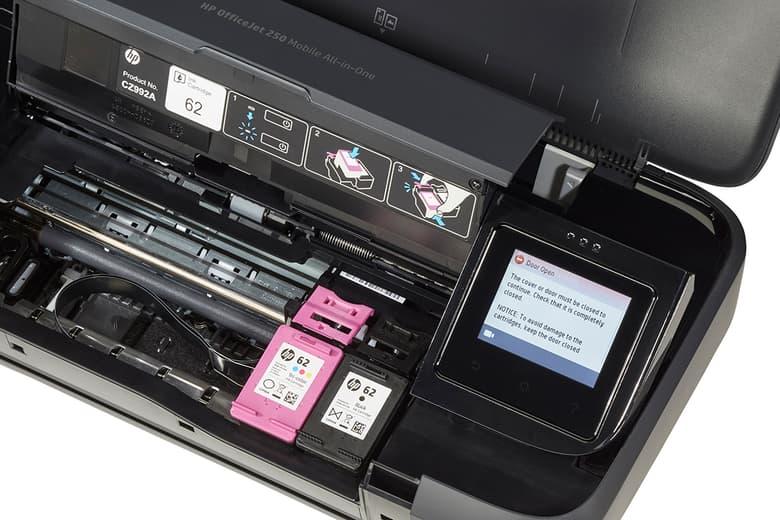
HP liquid ink cartridges
---
HP 680 Ink Cartridge — Black F6V27AA + Color F6V26AA
**Most searched for HP liquid ink in Saudi Arabia.**
Compatible printers:
HP DeskJet 1110
HP DeskJet 2135
HP DeskJet 2136
HP DeskJet 2138
HP DeskJet 3635
HP DeskJet 3636
HP DeskJet 3638
HP DeskJet 3790
HP Ink Tank 315
HP Ink Tank 319
HP Ink Tank 415
---
HP 652 Ink Cartridge — Black F6V25AA + Color F6V24AA
Compatible printers:
- HP DeskJet Ink Advantage 1115
- HP DeskJet Ink Advantage 2135
- HP DeskJet Ink Advantage 2335
- HP DeskJet Ink Advantage 2336
- HP DeskJet Ink Advantage 3635
- HP DeskJet Ink Advantage 3790
- HP DeskJet Ink Advantage 3835
---
HP 803 Ink Cartridge — Black F6V21AA + Color F6V20AA
Compatible printers:
HP DeskJet 1111
HP DeskJet 2131
HP DeskJet 2132
HP DeskJet 2133
HP DeskJet 3630
HP DeskJet 3632
---
HP 305/305XL Ink Cartridge — Black 3YM61AE + Color 3YM60AE
**For the latest generation of HP printers.**
Compatible printers:
HP DeskJet 2710
HP DeskJet 2711
HP DeskJet 2720
HP DeskJet 2721
HP DeskJet Plus 4110
HP DeskJet Plus 4120
HP DeskJet Plus 4122
HP ENVY 6010
HP ENVY 6020
HP ENVY 6030
---
HP 67/67XL Ink Cartridge — Black 3YM56AA + Color 3YM55AA
Compatible printers:
HP DeskJet 1255
HP DeskJet 2332
HP DeskJet 2755
HP DeskJet 4155
HP ENVY 6055
HP ENVY Pro 6455
---
Canon liquid ink cartridges and bottles
---
Canon PG-745 + CL-746 Ink
**Most searched Canon liquid codes.**
Compatible printers:
Canon PIXMA iP2870
Canon PIXMA iP2872
Canon PIXMA iP2873
Canon PIXMA iP2875
Canon PIXMA MG2470
Canon PIXMA MG2570
Canon PIXMA MG2970
Canon PIXMA MX397
Canon PIXMA MX457
Canon PIXMA MX497
---
Canon PG-740 + CL-741 Ink
Compatible printers:
Canon PIXMA MG2170
Canon PIXMA MG2270
Canon PIXMA MG3170
Canon PIXMA MG3270
Canon PIXMA MG4170
Canon PIXMA MG4270
Canon PIXMA MX377
Canon PIXMA MX397
Canon PIXMA MX437
Canon PIXMA MX457
Canon PIXMA MX517
Canon PIXMA MX527
Canon PIXMA TS5140
---
Canon GI-490 (Mega Tank) Ink Bottles
Compatible printers:
Canon PIXMA G1400
Canon PIXMA G2400
Canon PIXMA G2411
Canon PIXMA G3400
Canon PIXMA G3411
Canon PIXMA G4400
Canon PIXMA G4410
Printing capacity: Black 6,000 pages + Color 7,000 pages per bottle.
---
Canon GI-43 Ink Bottles
Compatible printers:
Canon PIXMA G540
Canon PIXMA G550
Canon PIXMA G640
Canon PIXMA G650
---
Canon GI-41 Ink Bottles
Compatible printers:
Canon PIXMA G2160
Canon PIXMA G3160
Canon PIXMA G2260
Canon PIXMA G3260
---
Epson liquid inks (EcoTank bottles)
---
Epson 003 — T00V Ink Bottles
**Most searched for Epson ink in Saudi Arabia.**
Compatible printers:
Epson L1110
Epson L3100
Epson L3101
Epson L3110
Epson L3116
Epson L3150
Epson L3156
Epson L3250
Epson L3256
Epson L3260
Epson L5190
Epson L5196
Printing capacity: Black 7,500 pages + Color 6,000 pages per bottle.
---
Epson 001 Ink Bottles — T03Y
Compatible printers:
Epson L4150
Epson L4160
Epson L6160
Epson L6170
Epson L6190
Epson L4260
Epson L6260
Epson L6270
Epson L6290
Epson L14150
Print capacity: Black 4,500 pages + Color 7,500 pages.
---
Epson T664 (EcoTank) Ink Bottles
Compatible printers:
Epson L100 / L110 / L120
Epson L200 / L210
Epson L300 / L310
Epson L355 / L360 / L365
Epson L380 / L386
Epson L455
Epson L550 / L555 / L565
Print capacity: Black 4,000 pages + Color 6,500 pages.
---
Epson 008 — T06G Ink Bottles
**For high-productivity professional printers.**
Compatible printers:
Epson L6550
Epson L6570
Epson L6580
Epson L15150
Epson L15160
Epson L6490
Printing capacity: Black 11,000 pages + Color 6,000 pages.
---
Epson 106 Ink Bottles (6 Colors — For Photos)
Compatible printers:
Epson EcoTank L7160
Epson EcoTank L7180
Epson EcoTank ET-7700
Epson EcoTank ET-7750
Suitable for professional printing of photos in 6 colors.
---
Brother liquid inks
---
Brother LC-3617 Ink Cartridges
Compatible printers:
Brother MFC-J2330DW
Brother MFC-J2730DW
Brother MFC-J3530DW
Brother MFC-J3930DW
---
Brother LC-3619XL Ink Cartridges
Compatible printers:
Brother MFC-J2330DW
Brother MFC-J3530DW
Brother MFC-J3930DW
Printing capacity: 3,000 black pages + 1,500 color pages.
---
Brother LC-527XL Ink Cartridges
Compatible printers:
Brother MFC-J3720
Brother MFC-J3520
 ---
---
Fifth: How to quickly identify the correct ink? A quick reference chart 📊
**Know your printer type from its name:**
The printer name contains LaserJet, Laser, or HL → Laser Toner
The printer name contains DeskJet, PIXMA, WorkForce, or EcoTank → Liquid Ink
**Find your code from the cartridge:**
Starts with CE, CF, or W → HP Toner
Starts with CRG → Canon Toner
Starts with TN → Brother Toner
Starts with 106R → Xerox Toner
Starts with F6V or 3YM → HP Liquid Ink
Starts with PG, CL, or GI → Canon Liquid Ink
It starts with T00, T03, T664, or T06 → Epson liquid ink
Starts with LC → Brother Liquid Ink
---
Sixth: Original toner or a substitute? The honest answer 💡
The most frequently asked question after knowing the correct code is: Should I buy the original or the alternative?
**Original Toner:** Guaranteed quality from the manufacturer, but it is expensive and drains the budget when printing intensively.
**Poor alternative toner:** Cheap price but a real danger — deteriorating print quality, ink leakage, potential damage to the print head and internal printer components.
**The Reliable Alternative Toner:** Such as [AWD Toner from Amwaj Al-Bahr Store] (https://amwajest.com/ar/Toner-AWD/c275141566) — a completely new product made from high-quality Japanese powder, with thermal packaging for each unit and updated chips compatible with the latest printer models. Quality identical to the original at a much lower price.
The simple rule: Don't buy any toner from an unknown source at an unbelievable price — the illusory savings turn into an expensive maintenance bill.
---
🚀 The tool that solves the compatibility problem forever
After all this evidence, one fact remains: you might forget the code, buy a new printer and not know its ink, or find a code written in English and wonder if it suits your printer.
This is precisely why this tool was created:
---
🔧 ps.amwajest.com — Free compatibility finder for printer ink
[Amwajest Store] (https://amwajest.com/ar) has created a specialized technical website **to help you find the right ink for your printer in seconds** — and it is completely free and does not require registration.
The tool works in both directions 🔄
**Search from printer → Ink 🖨️**
Type your printer's name or model in the search box, and all compatible ink and cartridge codes will appear immediately.
**Practical example:** Type "Canon imageCLASS MF217w" → You will see: CRG-737 with all compatible alternatives.
**Search from Ink → Printer 📦**
Enter the code for your ink or toner cartridge, and all compatible printers will be displayed.
**Practical example:** Type "TN-2380" → All compatible Brother printers will be shown in detail.
---
Why is this tool better than Google search? ✅
**Guaranteed Accuracy:** The results are tailored to your specific printer model, and are not general results that require filtering and verification.
**All-inclusive:** Includes HP, Canon, Brother, Epson, Xerox and more ink cartridges — original and reliable replacement.
**Constantly updated:** Keeps up with the latest printer models and ink codes on the market.
**Quick and simple:** One search box, instant results, no need to read long pages.
**100% FREE:** No account or subscription — open it from your phone anywhere, anytime.
**Designed for the average researcher:** Whether you are a printer expert or using it for the first time, the tool answers you with the same clarity.
---
---
How to use it? Just 3 steps 📱
**Step One:** Open [ps.amwajest.com](https://ps.amwajest.com/) from your phone or computer.
**Step Two:** Enter your printer name or ink code in the search box.
**Step Three:** Read the immediate result and shop for the appropriate ink from [Amwaj Al-Bahr Store] (https://amwajest.com/ar).
**Try it now:** [ps.amwajest.com](https://ps.amwajest.com/) 🔗
---
## Frequently Asked Questions ❓
Q: What does "XL" or "H" mean after the ink code?
A: This refers to the high-capacity version (High Yield). For example, the HP 305XL prints twice as much as the regular HP 305. The price is slightly higher, but the cost per page is much lower—better if you print in large quantities.
Q: Can I use HP toner in a Canon printer?
A: No. Each printer brand has a different cartridge shape and chip. Toner cartridges cannot be interchanged between different brands, no matter how similar the part numbers may be.
**Q: HP 85A and HP 85X toners — what's the difference?**
A: They are almost the same printers, but the HP 85X high-capacity version prints 2,200 pages compared to 1,600 pages for the 85A. If you print in large quantities, the 85X is more economical in the long run.
Q: Is liquid ink suitable for a laser printer?
A: No, never. These are two completely different types of printers and inks, and one cannot be substituted for the other.
Q: What's the fastest way to check my printer's ink?
A: Open [ps.amwajest.com](https://ps.amwajest.com/) on your phone, type in your printer name or the code on your cartridge, and you will get the answer in seconds.
Q: Is the replacement ink safe for my printer?
A: It depends on the source and quality. [Amwajest AWD Toner] (https://amwajest.com/ar/Toner-AWD/c275141566) is manufactured to standards that guarantee the complete safety of your printer—Japanese powder, updated chips, and rigorous quality control. Cheap, unknown-source alternatives, on the other hand, may damage your printer components and result in costly maintenance.
---
*Save the link [ps.amwajest.com](https://ps.amwajest.com/) now — you'll need it every time you're looking for your printer ink.*