

"I want to buy a printer, what do you recommend?" — This question is asked by many people daily, and the honest answer is: it depends on exactly what you need. 🎯
A student's printer is not the same as a restaurant owner's. A photographer's printer is completely different from an accountant's. The biggest mistake many people make is buying a printer based solely on price, only to discover weeks later that it doesn't meet their actual needs.
In this guide, we'll take you through each profession, identify its specific needs, suggest the best models, and tell you the correct ink code for each printer so you don't get confused when replacing ink cartridges. 🔍
Before we begin: The two questions that define everything ❓
Question 1: Will you be printing texts and documents, or images and colors?
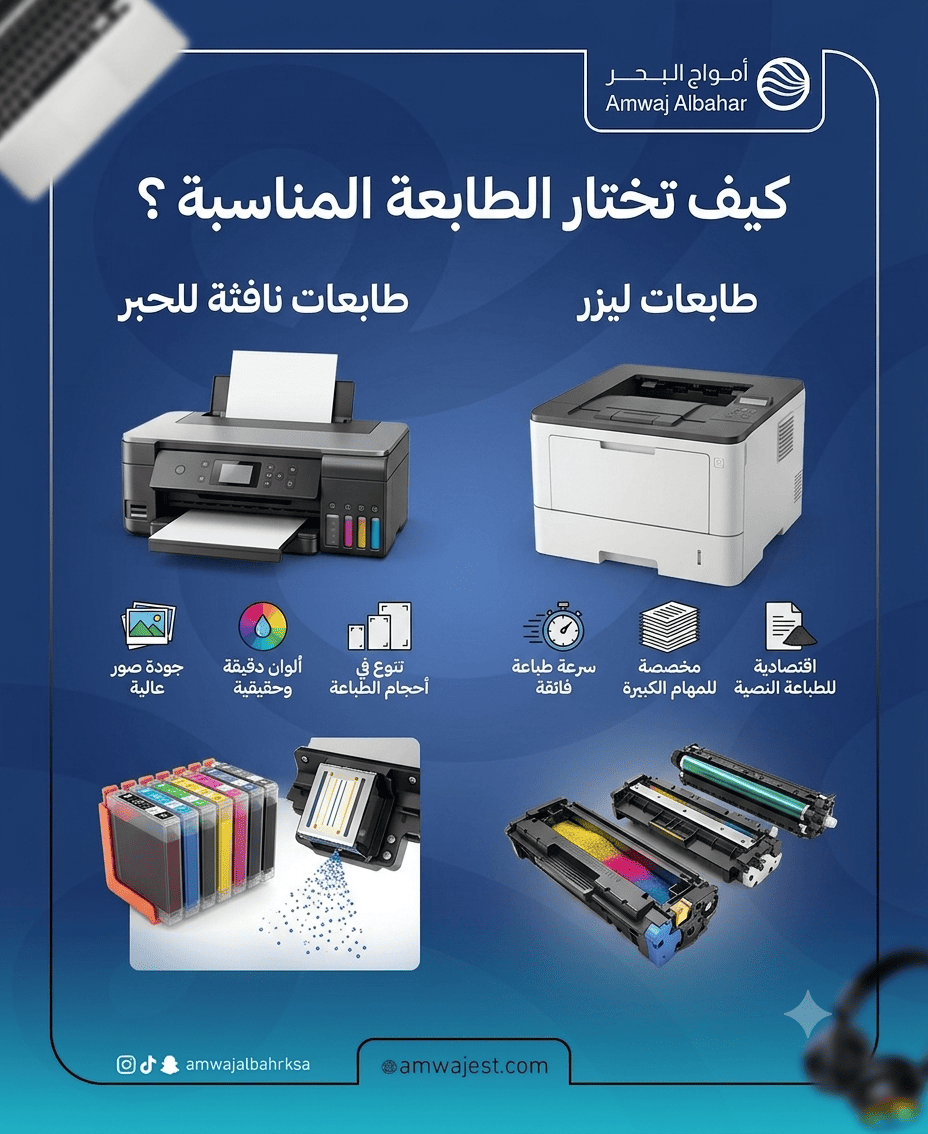
- Texts and documents → Laser is the best choice for you
- Images and colors → Inkjet or EcoTank
Question 2: How many pages will you print per month?
- Less than 200 pages → Economical home printer
- 200 to 1,000 pages → Medium laser printer
- Over 1,000 pages → Desktop laser printer or copier
Answering these two questions will save you a lot of trouble before you read the rest of the guide.
Student 🎒
What does the student really need?
The student mostly prints assignments, reports, research papers, and notes. Use is sporadic, not daily. Occasionally, color printing is used for presentations or projects. The budget is generally limited, and the room space is small.
The most important criteria for the student: low printer price + low ink cost + small size that doesn't take up much space.
⚠️ Important warning before choosing
Many students fall into the trap of buying a cheap printer with expensive ink. They buy an inkjet printer at a low price, only to find that the cartridges run out quickly and are expensive. The solution? An EcoTank printer with refillable ink tanks, or an economical laser printer if the printing is mostly text-based.
Suggested printers:
Epson EcoTank L3250 printer
Who is it for? For the student who occasionally needs color printing with long-term savings in ink costs.
Features:
- Refillable ink tanks print thousands of pages at a very low cost
- Print + Copy + Scan in one device
- Wi-Fi connection for printing directly from your phone
- Small size suitable for rooms
Ink code: Epson 003 (T00V) — Black and three-color compatible printers: L1110, L3100, L3101, L3116, L3150, L3250
🛒 Browse original and alternative Epson inks from the Sea Waves store.
HP LaserJet Pro M111w Printer
Who is it for? For the student who prints only text-based papers and documents and does not need colors.
Features:
- A fast laser printer that prints 20 pages per minute
- Very small size, suitable for a study desk
- Wi-Fi connection for wireless printing from your phone
- Low cost per page compared to Inkjet
Toner code: HP 105A — W1105A Compatible printers: HP LaserJet M111a, HP LaserJet M111w, HP LaserJet MFP M141a, HP LaserJet MFP M141w
🛒 Browse HP laser toner cartridges — or discover the reliable, budget-friendly alternative , AWD toner .
The teacher 📚
What does a teacher really need?
Teachers print significantly more materials than students: tests, worksheets, lesson plans, and sometimes presentations and colorful educational materials. Printing is done almost daily in moderate quantities, and speed is crucial because time is precious. Duplex printing saves paper and reduces costs.
The most important criteria for the teacher: speed + double-sided printing + reasonable operating cost.
Suggested printers:
Brother HL-L2370DW printer
Who is it for? The teacher who prints daily quantities of papers and tests.
Features:
- Fast laser printer, up to 32 pages per minute
- Automatic double-sided printing reduces paper consumption by 50%
- Wi-Fi + Ethernet connection
- Low cost per page compared to competitors
- A 250-sheet paper tray reduces the need for frequent paper refills.
Ink code: Brother TN-2420 (Regular) / TN-2410 (Economy) Compatible printers: Brother HL-L2310D, HL-L2350DW, HL-L2370DN, DCP-L2510D, MFC-L2710DW
🛒 Browse Brother laser toner cartridges from Amwaj Al-Bahr store.
Canon imageCLASS MF267dw printer
Who is it for? For the teacher who needs to print, copy, and scan all in one device.
Features:
- Multifunctional: Print, Copy, Scan, Fax
- Automatic double-sided printing
- Wi-Fi + AirPrint + Google Cloud Print
- Suitable for medium to heavy daily use
Ink code: Canon CRG-051. Compatible printers: Canon imageCLASS LBP162dw, MF264dw, MF267dw, MF269dw
🛒 Browse Canon laser toner cartridges from Amwaj Al-Bahr store.
Office owner 💼
What does the office owner really need?
In office environments, printers are in use all day. Printing delays mean lost work time. The priorities are: extremely high speed, long lifespan, the lowest possible cost per page, and the ability to handle large print runs.
Many large offices also require color printing for presentations and reports. Network printing capabilities for multiple users are essential.
The most important criteria for the office owner: speed + network + long lifespan + low cost per page.
Suggested printers:
HP LaserJet Pro M404dn Printer
Who is it for? Offices that print large quantities of text documents daily.
Features:
- Printing speed: 38 pages per minute
- A box of paper with a capacity of 350 sheets (100 extra)
- Network printing + automatic double-sided printing
- Very low cost per page
- Designed for heavy-duty workloads of up to 80,000 pages per month
Toner code: HP CF258A (58A) or CF258X (58X High Capacity) Compatible printers: HP LaserJet Pro M404n, M404dn, M404dw, MFP M428dw, MFP M428fdn
🛒 Browse HP office inks — or save with reliable, economical AWD ink .
Brother MFC-L8900CDW Printer
Who is it for? Offices that need fast, high-quality, professional color printing.
Features:
- Fast color laser printer (31 pages/minute color + black and white)
- Multifunctional: Print + Copy + Scan + Fax
- Wired and wireless network printing
- Ideal for offices that need colorful presentations daily.
Ink code: Brother TN-421 / TN-423 / TN-426 (Black + Yellow + Magenta + Cyan) Compatible printers: MFC-L8690CDW, MFC-L8900CDW, HL-L8360CDW
🛒 Browse the full range of Brother inks from the Sea Waves store.
Small business owners 📸
What does a photo project owner need?
Photographers, photo printing shops, and those who print color marketing materials—they need something completely different. The colors must be vibrant, vivid, and accurately reflect reality. The print resolution, measured in DPI, must be very high. The most suitable type here is a high-resolution inkjet or EcoTank printer—not a laser printer.
The most important criteria: high color accuracy + reasonable long-term cost.
Suggested printers:
Epson EcoTank L8050 printer
Who is it for? The owner of the business who prints A4-sized photos with studio quality.
Features:
- Print resolution up to 5,760 x 1,440 dots per inch
- 6 ink tanks (CMYK + Light Gray + Light Color) for professional color gradations
- Print up to 2,000 images before needing to refill the tanks.
- Suitable for small studio owners
Ink code: Epson 106 (EcoTank ink bottles) Compatible printers: Epson EcoTank L8050, EcoTank ET-8550
🛒 Browse Epson inks from the Sea Waves store.
Canon PIXMA G650 printer
Who is it for? For the small business owner who needs high-quality images with daily document printing.
Features:
- The MegaTank ink tank system prints 7,700 color photos.
- 6 colors for stunning color gradients
- Wi-Fi + Bluetooth for printing from your phone
- The cost of the ink is very low compared to traditional cartridges.
Ink code: Canon GI-46 (Mega Tank bottles) Compatible printers: Canon PIXMA G550, PIXMA G650
🛒 Browse Canon liquid inks from the Sea Waves store.
Sticker and label business owners 🏷️
What does a sticker business owner need?
Packaging businesses, retail stores, restaurants and bakeries, and startups—they all need label printers. The most suitable type is a thermal printer that doesn't require ink, or a specialized label printer.
The most important criteria: Label durability + ease of use + no need for frequent ink refills.
Suggested printers:
Brother QL-820NWBc printer
Who is it for? For shop owners and businesses that print stickers in large quantities and colors.
Features:
- Color label printer with thermal printing technology
- Printing speed: 104 labels per minute
- Wi-Fi + Ethernet + Bluetooth
- Automatic sticker cutting
Tape used: Brother DK-22251 (Cuttable Adhesive Colored Stickers)
Epson LabelWorks LW-K400 printer
Who are they for? Small business owners who need simple labels for categorization and packaging.
Features:
- Portable and compact size
- Durable, waterproof, and heat-resistant label printing
- Easy to use without the need for a computer
- Suitable for labeling products, shelves, and warehouses
Tape used: Epson TZ / TZe Series
Family home use 🏠
What does the house really need?
Every home needs a multi-functional printer: children print homework, parents print documents occasionally, and they might need to print a family photo from time to time. The key features: ease of use, wireless printing from a phone, convenient size, and reasonable cost.
Suggested printers:
HP DeskJet 4120e printer
Who is it for? For a family that needs a simple printer for light everyday use.
Features:
- Print + Copy + Scan in one integrated device
- Wi-Fi + Bluetooth + HP Smart App for printing from your phone
- Small size fits anywhere
- Very reasonable price
Ink code: HP 305 / HP 305XL Compatible printers: HP DeskJet 2710, 2711, 4120, 4122, 4130
🛒 Browse HP liquid inks from the Sea Waves store.
Canon PIXMA MG2540S printer
Who is it for? For families on a limited budget who print in small quantities.
Features:
- The cheapest in the home printer category
- Print + Scan + Copy
- Good color quality for printing family photos
- Simple to set up and use
Ink code: Canon PG-745 (black) + CL-746 (color) Compatible printers: Canon PIXMA iP2870, MG2470, MG2570, MX497, MG2540S
🛒 Browse Canon liquid inks from the Sea Waves store.
Shop and restaurant owners — Receipt printer 🧾
What does the shop owner need?
Restaurant owners, grocery store owners, pharmacies, and electronics stores need a completely different type of printer: a thermal receipt printer . This type uses no ink at all, relying instead on heat-sensitive thermal paper. It's very fast, compact, and has very low long-term operating costs.
The most important criteria: Speed + Reliability + Ease of connection to the Point of Sale (POS) system.
Suggested editions:
Epson TM-T20III printer
Who is it for? Restaurants, grocery stores, and high-demand retail outlets.
Features:
- Printing speed up to 250 mm/second
- Automatic bill cutting
- USB + Ethernet connection
- Exceptional lifespan, withstands intensive use throughout the day
- Compatible with most POS systems and accounting software
Paper used: 80mm wide thermal paper — no ink needed at all
Xprinter XP-N160II printer
Who is it for? For the small business owner who wants an affordable invoice printer.
Features:
- Fast and reliable thermal printer
- Automatic bill cutting
- USB + Bluetooth for wireless connection to the app
- Very compact size, suitable for small shop counters
- Very competitive price for startup projects
Paper used: 80mm thermal paper — without ink
Quick comparison table for all categories 📊
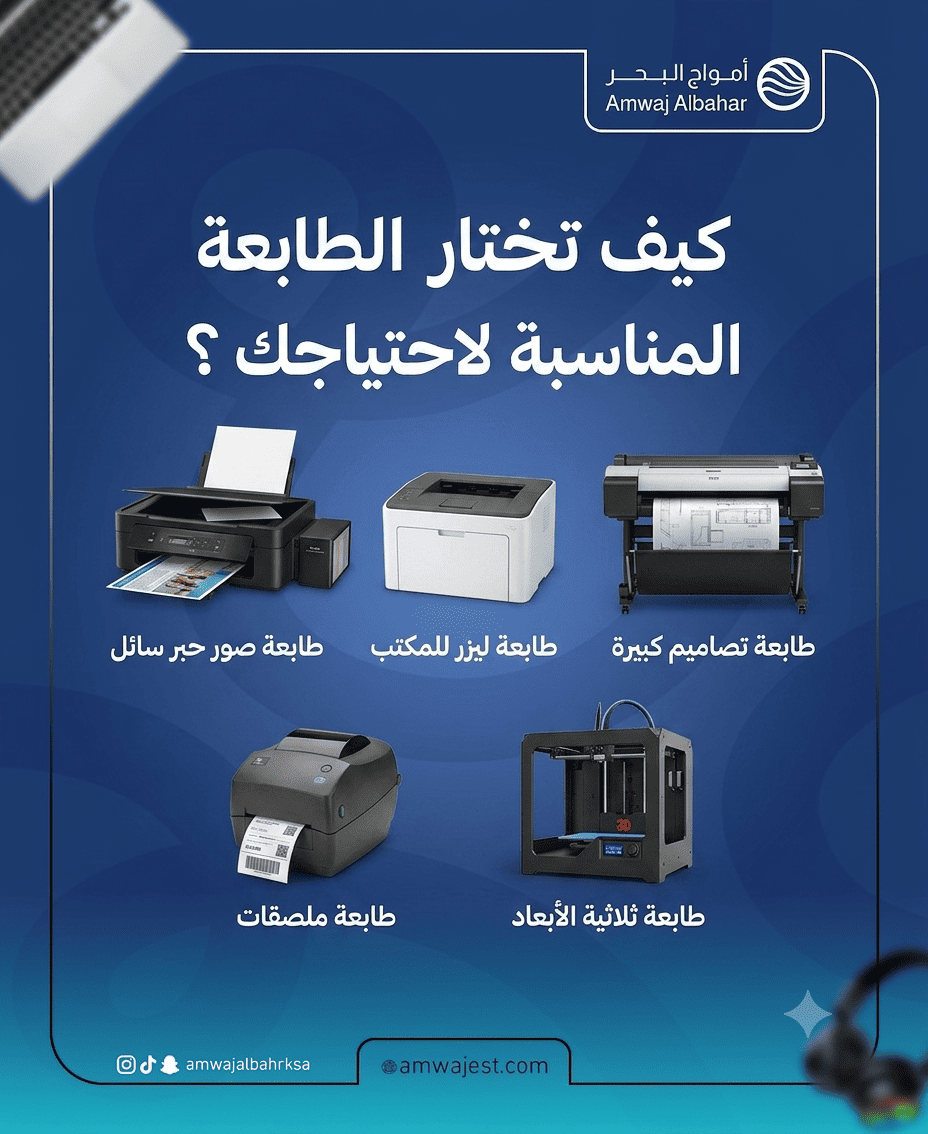
For students and home users: EcoTank or economical laser — Epson EcoTank L3250 or HP LaserJet M111w
Instructions: Laser with double-sided printing — Brother HL-L2370DW or Canon MF267dw
Office (Intensive Printing): Fast desktop laser — HP LaserJet Pro M404dn or Brother MFC-L8900CDW
Printing photos and creative projects: High-resolution EcoTank — Epson EcoTank L8050 or Canon PIXMA G650
Label printing: Specialized label printer — Brother QL-820NWBc or Epson LabelWorks
Receipt printer for shops: Thermal, inkless — Epson TM-T20III or Xprinter XP-N160II
Where can you find printer ink in Saudi Arabia? 🛒
After choosing the right printer for you, an equally important question arises: where do you buy its ink?
Amwaj Al-Bahr store specializes in providing printer ink in Medina and Riyadh, with fast shipping to all cities in the Kingdom:
- Genuine laser toner cartridges — HP, Canon, Brother, Xerox, and Epson
- High-quality AWD replacement ink — save up to 60% compared to the original with identical quality
- Liquid inks — HP, Canon, Epson, and Brother
- Various new printers
💡 Golden Tip: Use the free compatibility tool from Amwaj Al-Bahr Store at ps.amwajest.com to quickly and easily find the right ink for your printer model.
📍 Madinah: King Abdullah Road — Central Market — Al Wabrah District 📍 Riyadh: King Fahd Road — Al Washm District — Al Salihia Computer Center — Gate 2 🚚 Shipping to all cities in the Kingdom — Orders prepared on the same day
Frequently Asked Questions ❓
Q: What is the real difference between a laser printer and an inkjet printer? A: Laser printers use a dry toner powder that is heat-fixed to the paper. They are faster and more cost-effective per page for high-volume printing, but their color quality is lower. Inkjet printers spray ink onto the paper and produce more vibrant and accurate colors, but their cartridges are more expensive for heavy use. Laser printers are for documents, and inkjet printers are for photos.
Q: Is an EcoTank printer better than a cartridge printer for home use? A: Yes, mostly if you print regularly. An EcoTank printer has a slightly higher initial cost, but the cost per page is much lower because the ink bottles print thousands of pages compared to regular ink cartridges that run out quickly. If you print very lightly (less than 50 pages per month), the price difference may not be worth it.
Q: Do I need a color or black and white printer? A: If you only print documents (assignments, reports, invoices) → black and white is sufficient and much more economical. If you print photos, presentations, or marketing materials → color is essential. Remember that a color printer can print in black and white, but the reverse is not true.
Q: How do I know which ink cartridge is right for my new printer? A: Look on the printer box or in the manual—you'll find the compatible cartridge number. The easiest way is to use the free compatibility tool at ps.amwajest.com —just enter your printer's name and all compatible inks will be shown.
Q: Are replacement ink cartridges suitable for new printers? A: Yes, provided you choose a reliable, high-quality replacement ink cartridge. AWD ink cartridges from Amwaj Al-Bahr store are manufactured entirely new using high-quality Japanese powder, and their chips are constantly updated to be compatible with the latest printer models. They offer print quality comparable to the original at a significantly lower price.
Q: Which is better for office use: HP or Brother? A: Both are excellent, but each has its strengths: HP is widely available and its ink cartridges are readily accessible. Brother is known for its lower cost per page and typically longer printer lifespan. For heavy office use where long-term cost reduction is a priority, Brother is often the more economical option.
Have you found the right printer for you? If you need help choosing the right ink, contact the Amwaj Al Bahr Store team or search via the compatibility tool at ps.amwajest.com .